When you’re preparing data for an agent, the agent is often the one doing the import: rerunning a full import of a project’s docs in the middle of the night, getting halfway through when the service restarts, with nobody watching. What you worry about then is whether anything got left half written. If the store still holds half a document, the agent might pull it up later and give an incomplete, or even wrong, answer.
With the Agent First design in Cortrix, the agent doesn’t need to know a crash ever happened: after a restart it won’t retrieve the half-written data a crash left behind, nobody has to sit there running repair commands by hand, and unfinished documents get fixed on their own. Cortrix gets there with atomic writes and recovery per namespace: each namespace has its own vector index, SQLite database, and write log, all managed by a Write Coordinator. Writing a document either finishes completely or rolls back, and recovery only happens inside that namespace (the same idea as a database rolling back uncommitted transactions when it restarts).
Killed with kill -9 halfway through a write
Here’s an example with an engineering assistant agent. It serves lots of projects across the company, one namespace per project. We simulated a full import for one of those projects: using the Python SDK, we submitted 40 Markdown documents to one namespace, each about 29 KB and split into 61 blocks. As soon as blocks from an unfinished document showed up in SQLite, we killed the process outright with docker kill -s KILL, without even giving it a chance to write a rollback.
At the moment of the kill, here’s what was on disk: 61 vectors in the vector index log, only 50 blocks in SQLite, 2 documents stuck in “processing,” and not a single document finished. Vectors and blocks didn’t match, and that’s exactly the half written state we wanted.
Then we restarted the service on the same data, and the log showed this line:
[store] Recovered 2 crashed documents (2 processing, 0 deleting)-
This line is the check and cleanup: the 2 documents caught halfway were set back to pending, and the parts already written were cleared out.
-
Right after that, their tasks went back in the queue. The service was healthy again about 16 seconds after the kill, and all 40 documents finished processing after that.
We parsed this namespace’s vector log entry by entry and compared it with the blocks in SQLite: 2440 vectors, 2440 blocks, no vector or block missing, and nothing extra either. The 61 vectors and 50 blocks already written at the moment of the kill were all cleared during recovery, then written again as those 2 documents were reprocessed.
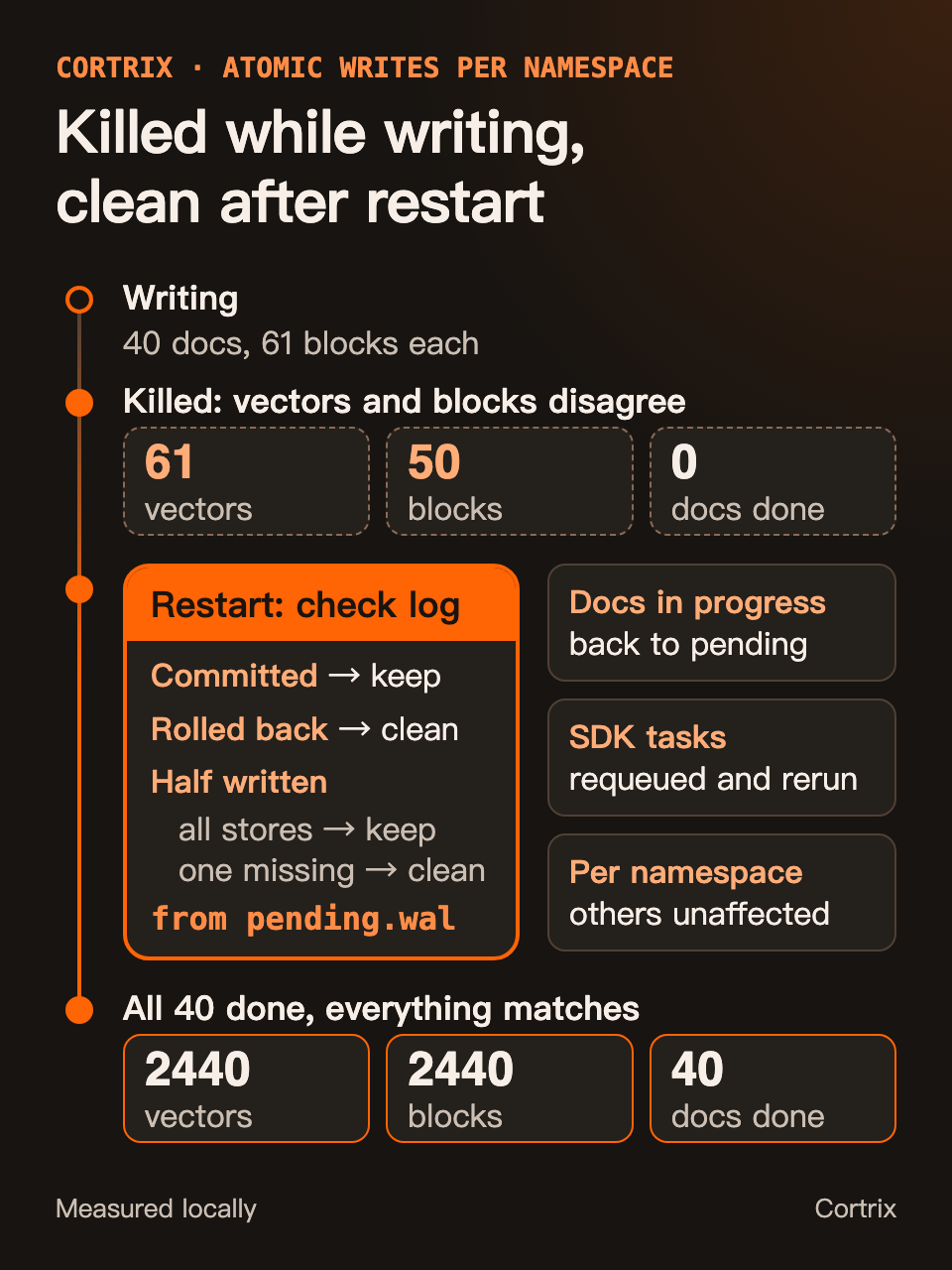
Figure 1 | Killed with kill -9 halfway through a write, then checked, cleaned up, and redone one write at a time per namespace on restart.
What Cortrix checks on restart
In this namespace’s pending.wal, writing one document is one transaction. First it logs a PENDING entry. Then it writes the vectors into the vector index log hnsw.wal and the blocks into store.db (and when there’s an original file, it saves a copy of that too). Once everything succeeds, it logs COMMITTED. If anything fails along the way, it logs ROLLBACK and cleans up.
A write that gets hit with kill -9 never gets past PENDING in pending.wal: there’s no COMMITTED or ROLLBACK after it. When Cortrix loads each namespace, it first scans that namespace’s pending.wal from the top:
- Already COMMITTED: leave it alone.
- Already rolled back (ROLLBACK): run the cleanup again. Cleanup is idempotent, so running it twice is fine.
- Only PENDING: check one by one whether the vectors, blocks, and original file are all there. If they are, the only thing missing was that final COMMITTED, so it’s treated as committed. If anything is missing, the parts already written get cleared out.
After the check, any document still stuck in “processing” goes back to “pending.” Documents submitted through the SDK or MCP (Model Context Protocol) have their tasks recorded in a persistent task table, and tasks stuck in processing for less than 24 hours get requeued when the service starts, while older ones are marked failed. The check and cleanup happen only in this one namespace’s files, and other projects’ namespaces aren’t touched.
How Pinecone, Turso, and Chroma do it
Splitting data by tenant or by project is something plenty of others do too. Pinecone’s docs recommend one namespace per tenant.
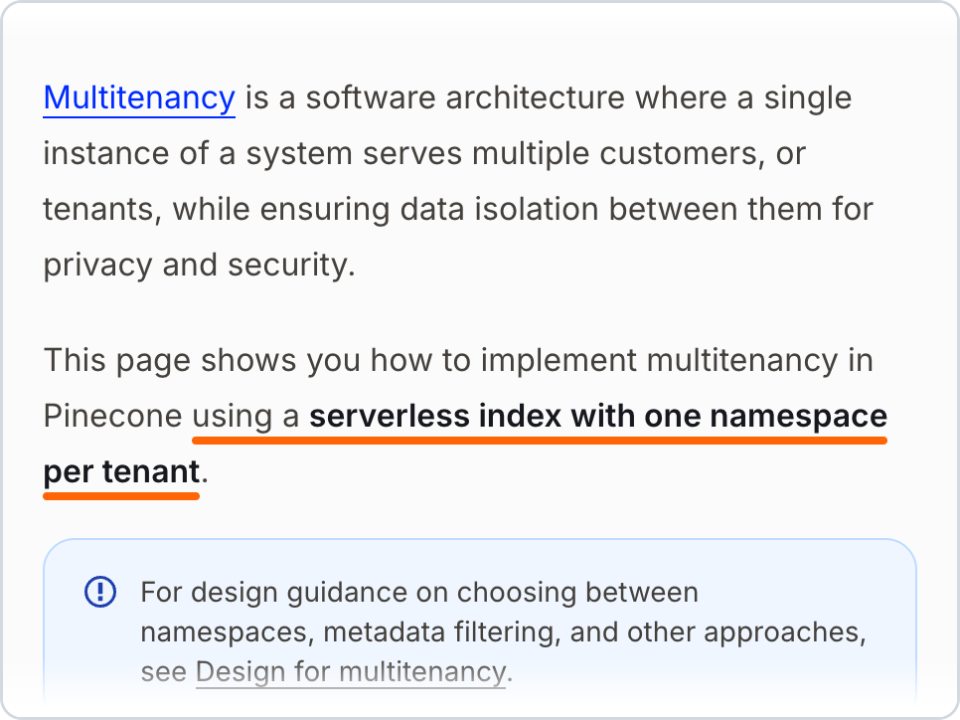
Figure 2 | How the Pinecone docs handle multitenancy, captured 2026-10-12. See reference [1]
Turso makes the database itself the unit you split by tenant, so each user or each project can have its own database.
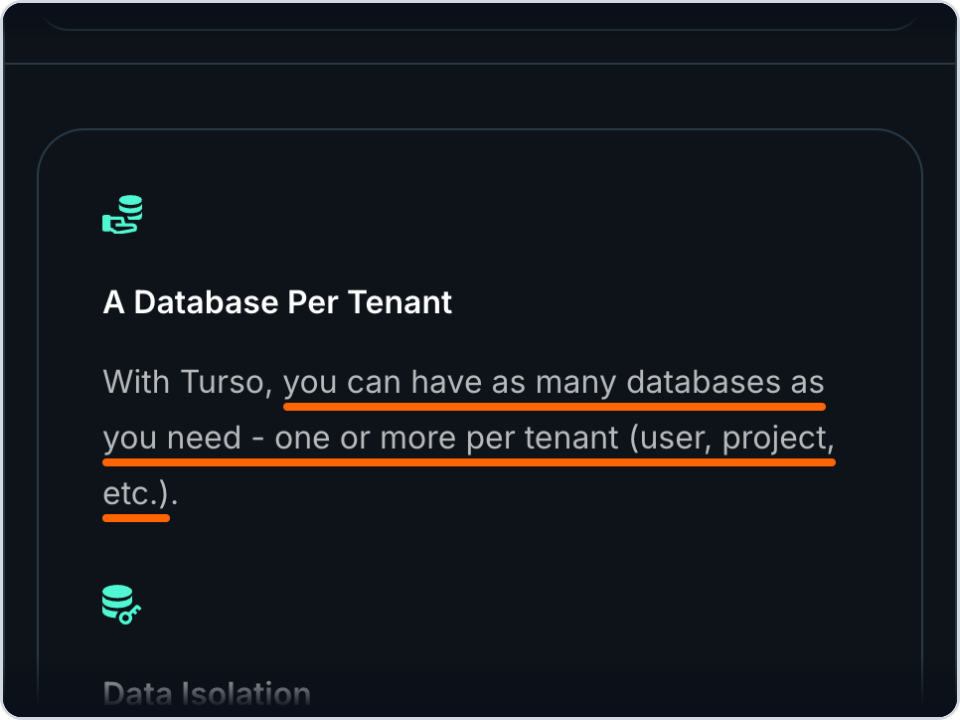
Figure 3 | Turso on “one database per tenant,” captured 2026-10-12. See reference [2]
Chroma’s architecture overview says it hands off as much work as it can to durable, well understood subsystems like SQLite and object storage.
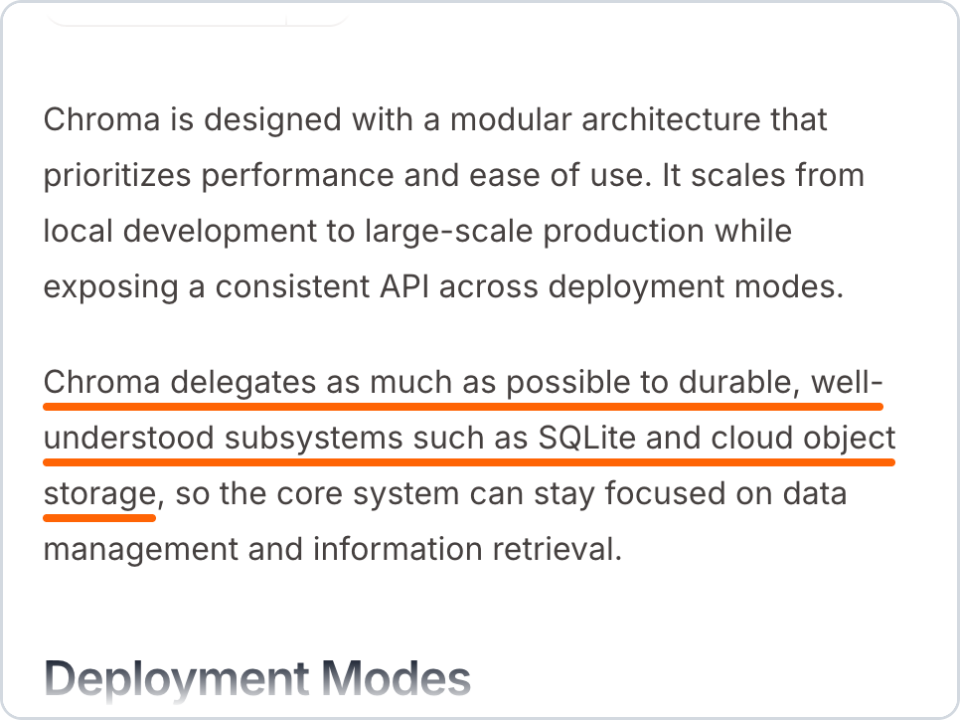
Figure 4 | The architecture overview in the Chroma docs, captured 2026-10-12. See reference [3]
Those three sources are about how to split data up and what to store it in. In Cortrix, the vector index and SQLite are two separate stores, so one Write Coordinator treats a document’s writes across them (plus the original file, when there is one) as a single unit, and after a crash it checks them as that same unit. The store cleans up what was only half written by itself, instead of leaving the agent to mop up the mess.
The Agent First bar
Agent First design here means the agent can take the data the store hands it and just keep going, without a person in the middle tidying up or relaying things. By that bar, atomic writes and recovery per namespace gets three things done:
- After a restart, the agent never retrieves the half-written data a crash left behind, so it doesn’t have to check first whether a crash happened.
- Nobody has to run any command to recover. A restart is all it takes.
- Unfinished writes pick up again on their own, instead of sitting in “pending” until somebody notices.
All three of those are about what happens after a crash. While an import is still running, parts of a document that hasn’t finished may already show up in results. If your agent needs whole documents, have it check that a document’s status is ready first.
What kind of data fits a split by namespace
Our advice: first ask whether your data naturally splits into lots of pieces, and whether each piece needs to be redone on its own.
-
If your agent organizes knowledge by project or by task, and each piece gets imported and redone separately, splitting by namespace helps. When an import goes wrong halfway, the check and the recovery only happen in that one piece, and other projects don’t get dragged in.
-
If you need far more than 64 pieces, say one per end user, switch to a coarser split, or spread them across several service instances.
Use Cortrix, or write the glue code yourself
If Cortrix isn’t the semantic storage under your agents, you can organize data the same way in other systems. For example, you can go with one namespace per tenant, like we mentioned above. You’re also welcome to dig through the public Cortrix source.
If you want to build storage that’s split by project yourself, there are four problems you have to get right:
- One document has to be written into both the vector index and the metadata database, and sometimes there’s an original file too. These have to finish together, or get cleaned up together when something fails. Otherwise, after a failure or crash partway through, queries will keep running into data that’s only half written.
- When the process gets killed in the middle of a write, it has no chance to clean anything up. On restart, you have to be able to tell from the log how far each write got, then keep what should be kept and clean up what should be cleaned up.
- After cleanup, unfinished writes have to start again on their own, instead of sitting in “pending” until somebody notices.
- When one query spans several pieces of data, you have to merge the results and deduplicate them, and when one piece can’t be queried, you have to tell the caller which part is missing.
Each of these four means glue code, and you’ll be maintaining it for the long haul. Crash recovery is the worst of it: it almost never runs day to day, and when it does break, it’s hard to reproduce. If you’d rather not write all that code by hand, or pile more management work on yourself down the road, just use Cortrix. Spend your time on your product and let Cortrix handle the data plumbing.
Try it on your own machine
We put both experiments from this post into the Cortrix repo under examples/namespace-recovery. Get Cortrix running with the Quickstart, install the Python SDK (pip install cortrix), and run these three lines from the repo root:
git fetch --depth 1 origin main
git checkout FETCH_HEAD -- examples/namespace-recovery
python examples/namespace-recovery/crash_check.py
It creates a new namespace, submits 40 documents, hits the Quickstart container with kill -9 halfway through the writes, and starts it back up. Once all 40 are processed, it checks two things through the public API: whether all 40 finished, and whether the documents being written at the moment of the kill have exactly as many blocks as a fresh, clean upload would give. Anything extra is leftover that didn’t get cleaned up. Heads up: it really does restart your Cortrix container. Here’s the output from our run:
namespace: recovery-check-1792684166
submitted 40 documents
killed the server with SIGKILL: completed 2, processing 2, queued 36
caught mid-write: doc-002.md, doc-003.md
healthy again after 15 s
tasks after restart: completed 40
documents ready: 40/40
blocks in namespace: 2440 (sum over documents: 2440)
doc-002.md: 61 blocks after recovery, 61 in a clean upload
doc-003.md: 61 blocks after recovery, 61 in a clean upload
PASS
The script uses exactly the same 40 documents as the experiment above, so it also ends up at 2440 blocks. This time the documents being written at the kill were doc-002 and doc-003, and after recovery each has 61 blocks, exactly the same as a fresh, clean upload. The public API only gives block counts, not vector counts, so the script checks documents and blocks. The entry by entry comparison of vectors and blocks earlier in the post came from parsing the vector log ourselves.
The other script, two_projects.py, creates namespaces for two projects, uploads the same coding standards doc to both, then runs one query across both projects:
proj-pay-1792684950      coding-standards.md    rerank_score=0.9949
proj-search-1792684950   search-api.md          rerank_score=0.0004
proj-pay-1792684950      payment-gateway.md     rerank_score=0.0001
coverage_ratio=1.0 deduplicated_chunks=1
On v1.0.0-rc.2, the last two results may come back in the other order.
The number after each namespace name is a timestamp. The script picks new names every time, so you can rerun it as often as you like. Each project has its own copy of the coding standards doc, but it shows up only once in the results, and deduplicated_chunks=1 is the copy that got merged away. The other two results both have a rerank_score below 0.001 and don’t have much to do with the question. Before you pass results to a model, you can set a rerank_score threshold to drop them. One caveat: some results are found by searching whole documents and never go through the reranker. Their rerank_score is the fused score from that search, not a reranker score, so don’t hold them to the same cutoff.
If this experiment saved you from writing recovery logic yourself, give Cortrix a Star on GitHub, and tell us in an issue how your agent organizes its data.
Frequently asked questions
What are atomic writes and recovery per namespace?
Atomic writes and recovery per namespace is what the Write Coordinator does in Cortrix semantic storage: each namespace has its own vector index, SQLite database, and write log, and writing a document is one unit across those places, so it either finishes completely or gets cleaned up on failure or restart. After a process crash, Cortrix checks and cleans up per namespace on restart, then reprocesses the documents that didn’t finish.
Will my data get corrupted if the server is killed during a write?
Nothing gets left half written. On restart, Cortrix checks every write that wasn’t committed and cleans up any that’s missing a piece. Documents submitted through the SDK or MCP get reprocessed automatically as long as the restart happens within 24 hours.
How many namespaces can one Cortrix server have?
In the current version, up to 64 per service instance. All namespaces get loaded at startup and stay resident, and each empty namespace takes about 46 MB of memory (v1.0.0-rc.2, CPU build).
References
- [1] Pinecone Docs, Implement multitenancy: https://docs.pinecone.io/guides/index-data/implement-multitenancy
- [2] Turso, Database Per Tenant: https://turso.tech/multi-tenancy
- [3] Chroma Docs, Architecture Overview: https://docs.trychroma.com/reference/architecture/overview
- [4] Cortrix on GitHub: https://github.com/cortrix/cortrix
- [5] Code for the experiments in this post, examples/namespace-recovery: https://github.com/cortrix/cortrix/tree/main/examples/namespace-recovery
- [6] Cortrix Quickstart: https://cortrix.ai/docs/get-started/quickstart/
- [7] Cortrix docs, Architecture overview: https://cortrix.ai/docs/concepts/architecture/
- [8] Cortrix docs, Query and reranking: https://cortrix.ai/docs/guides/query/
The commands and output in this post come from a local build of Cortrix main at commit f933121 (it reports 1.0.0-rc.2), CPU only, with no LLM configured. The recovery path described here works the same way in the v1.0.0-rc.2 tag. We also ran both example scripts on v1.0.0-rc.2: crash_check.py passes there too, and the one difference in two_projects.py is noted above.