Ask most of us whether an API call worked and we look at the HTTP status code first. 200 means it worked, and anything else means it didn’t. But when one request has to hit several places at once, you often get something in between. APIs used to be written for code that people write by hand. Cortrix is built for agents first, and we call that Agent First. When a query only partly works, Cortrix returns a partial success response. This post walks through what comes back when some of the data can’t be reached, how an agent should use it, and which callers should treat it as a failure.
One query only half worked. Now what?
Take a customer support agent. A user asks, “Where’s my refund?” To answer, the agent has to look in two places at once: the refund rules in the policy store, and this user’s orders in the order store. Right then, the order store doesn’t respond.
An API can handle this in one of two ways. It can fail the whole request. Then the agent can’t use the policy results even though they were already found, so it walks away with nothing and starts over. Or it can hand the policy results to the agent right away, and also tell it that the order store didn’t come back this time, why, and whether it’s worth trying again.
This is where Agent First comes in. We go with the second option. A query can span several namespaces. When one of them fails, the request still returns HTTP 200. You get the results that came back, and what failed shows up in meta.
The diagram below shows the Cortrix partial success response: what comes back when part of a query fails, and what the agent can do next.
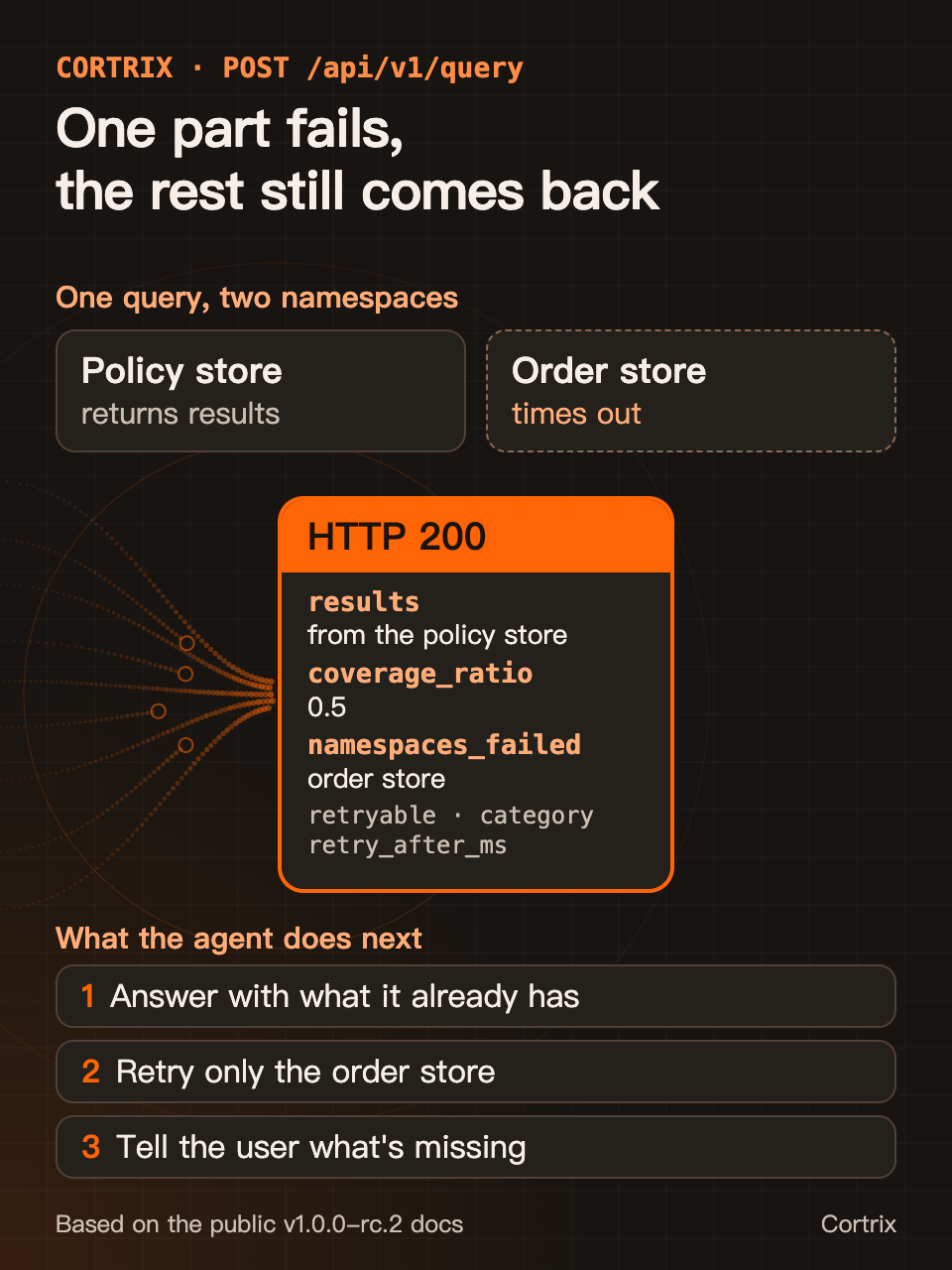
Figure 1 | The Cortrix partial success response: what comes back when one part fails, and what the agent can do next.
Plenty of systems already return partial results from one request. The Elasticsearch search API allows partial results by default: when some shards time out or fail, you still get the results from the rest.
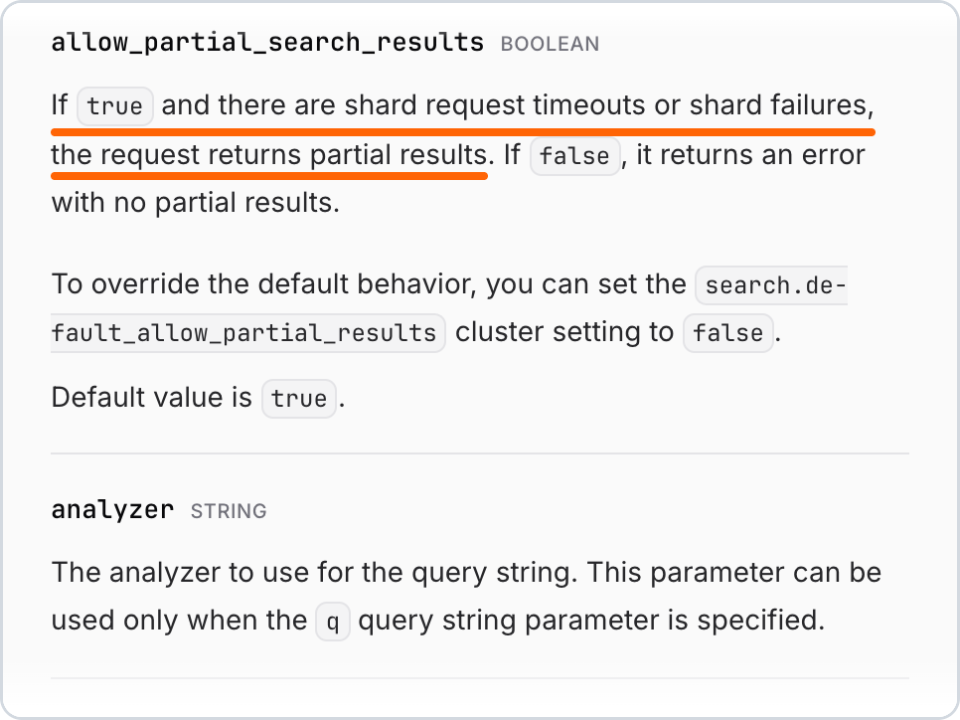
Figure 2 | The Elastic docs on allow_partial_search_results, captured 2026-10-12. The orange underline is ours. See reference [1]
When Amazon S3 deletes several objects in one request and one of them can’t be deleted, the response is still a 200, and it says for each object whether it worked.
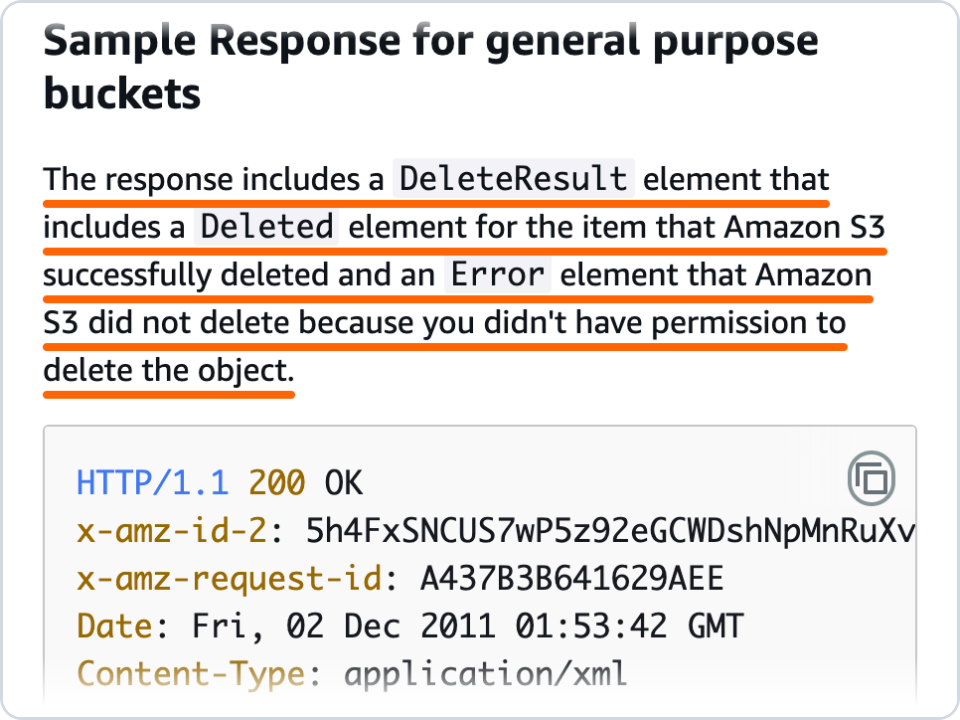
Figure 3 | The Amazon S3 DeleteObjects API reference, captured 2026-10-12. See reference [2]
The GraphQL spec also says one response can carry both partial data and errors for individual fields.
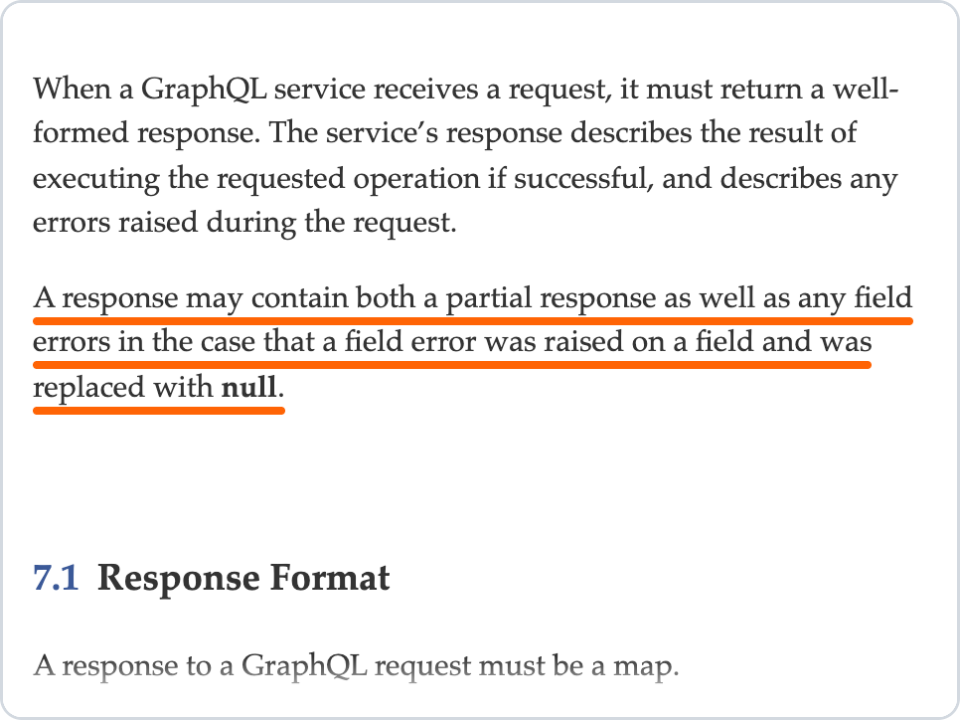
Figure 4 | The GraphQL spec on data and errors in a response, captured 2026-10-12. See reference [3]
All of these were designed for programs that people write, where hardcoded logic, written from the docs, decides what to do with each response. Our take is Agent First. We build for agents first, so every failure says whether it can be retried, what kind of problem it is, and how long to wait. The agent doesn’t have to parse error text to figure out its next step.
By Agent First we mean this: when we design an API, the first question is whether an agent holding this response can just keep going. So we hand over whatever results we have, say plainly what’s missing, and put the next step right in the response so the agent doesn’t have to guess.
An Agent First response
Here’s an example from our docs site, which is based on v1.0.0-rc.2. guide is a namespace with data in it, and nope stands in for a scope that can’t be queried:
curl -fsS -H 'Content-Type: application/json' \
  -d '{"namespaces": ["guide", "nope"], "query": "refunds", "top_k": 2}' \
  http://127.0.0.1:8420/api/v1/query
The request returns a 200, and results holds what came back from guide. The failure in this example isn’t the timeout from the scenario above. nope is a scope the query can’t reach, so it’s marked not retryable. We’ll get to timeouts below. Here’s meta this time:
{
  "coverage_ratio": 0.5,
  "namespaces_failed": [
    {
      "category": "permanent",
      "error_code": "CX_ERR_INDEX_CORRUPT",
      "message": "CX_ERR_INDEX_CORRUPT",
      "namespace": "nope",
      "retry_after_ms": null,
      "retryable": false,
      "structured_data": { "index_state": "unavailable", "namespace": "nope" }
    }
  ],
  "namespaces_queried": ["guide", "nope"],
  "namespaces_succeeded": ["guide"]
}
Two fields in meta are there for the agent:
coverage_ratio: a number for completeness. The 0.5 here means only one of the two namespaces came back. Any time it’s below 1, the results cover only part of what you asked for.namespaces_failed: the list of failures. Each entry names the namespace that failed and tells you what to do about it:retryable: whether it’s worth retrying.retry_after_ms: how long to wait before you try again.category: what kind of problem it is.
category has five values, and each one maps to a way of handling it:
auth,permanent: don’t retry the request as is.transient,timeout: retry after the suggested wait.quota: cut the size or the rate of your requests first.
One detail. nope is actually a namespace that doesn’t exist, but the query API’s response doesn’t say so. It reports the namespace as unavailable. A comment on the query path in the public Cortrix source calls this a guard against namespace enumeration.
With real workloads, the other case you’ll see is a timeout. Each namespace has its own time budget. The one that runs over is recorded as CX_ERR_NS_TIMEOUT and marked retryable, and the results from the other namespaces come back as usual.
Submitting documents in a batch follows the same rules. One request can submit up to 100 documents, and when some of them fail, the request still returns a 200. The ones that failed are listed in meta.failed[], and each entry carries retryable, category, and retry_after_ms too.
Which agent calls need a partial success response
Our advice: start with who the caller is and what it’s going to do with the result.
-
If the caller is an agent gathering material for an answer, a partial success response helps. The agent can use the results it already has, retry only the part that’s retryable, and tell the user which part it couldn’t get this time. That way it doesn’t take half the material and write an answer that looks complete.
-
If the caller is doing evaluation, reconciliation, or batch processing, or it has to produce a number like “how many records in total,” it should treat a
coverage_ratiobelow 1 as a failure, and either rerun the request or throw the result away. In this kind of work, an incomplete result that gets recorded as a normal one is harder to catch than an outright error. -
If you’re building monitoring, keep in mind that a partial failure doesn’t show up in the status code. Emit separate metrics for
coverage_ratioandnamespaces_failed, or they’ll never show up on a dashboard. Going by the public source, the request still returns a 200 even when every namespace fails. In that casecoverage_ratiois 0 andresultsis empty. -
If the caller is a client you don’t control, or there are gateways and retry middleware in between that only look at the status code, we recommend turning incomplete results into errors in your own service layer before you pass them along.
In Cortrix, every query response includes coverage_ratio and namespaces_failed, so your agent can make these decisions itself. Here’s one way to handle a query with the Python SDK. retry_later, note_missing, and answer_with stand for your own application functions:
from cortrix import Cortrix

client = Cortrix(base_url="http://localhost:8420", api_key="your-cortrix-api-key")
resp = client.search(["policy", "orders"], question)

if resp.meta.coverage_ratio < 1:
    for failed in resp.meta.namespaces_failed or []:
        if failed["retryable"]:
            # Retry only the namespace that failed, after the wait it suggests
            retry_later(failed["namespace"], wait_ms=failed["retry_after_ms"] or 1000)
        else:
            # Record it, and say in the answer that this part couldn't be reached
            note_missing(failed["namespace"], failed["category"])

answer_with(resp.results)
When you integrate, go by retryable and category in the response. Don’t match on the text of the error code.
Two other cases to watch for
The first is a bad request. Cortrix still answers those with a 4xx, not a 200. For example, a query that uses the deprecated singular namespace field gets a 400, and structured_data tells you to use namespaces instead. You only get a partial success response when the request itself is fine and part of what it asked for couldn’t be queried.
The second is async processing. A successful upload request only means the task was accepted. To find out how the document processing actually went, you have to check the task’s progress. The progress carries an agent_decision_hint: when it’s done_fetch_doc, the agent can go read the document, and when it’s inspect_error_code, the agent should look at the error code. An inline upload returns a 202 first even if the namespace is wrong, so the problem only shows up in the task progress.
Use Cortrix, or write the glue code yourself
If Cortrix isn’t the semantic storage under your agents, you still have to do the same check in whatever system you use. With Elasticsearch, look at _shards.failed in the response, or set allow_partial_search_results to false so it returns an error when the results are incomplete. With an S3 DeleteObjects call, go through the response one item at a time and check for an Error. With GraphQL, look at both data and errors.
If you want to build a partial success response into your own API so an agent can use it directly, there are four things you have to get right:
- The response needs a number for completeness. A caller should be able to look at that one number and know whether the result is complete.
- The response needs a list of what failed. Telling the caller “some part failed” isn’t enough. It needs to know exactly which part.
- Every failure needs to say whether it can be retried and what kind of problem it is. Without those two, the agent on top is back to parsing error text, and it can’t make the business decisions that come next.
- Every retryable failure needs a suggested wait time. Otherwise the caller can only guess, and it’ll either retry too soon or wait too long.
Each of these four means glue code. It has to behave the same on every endpoint that can return partial results, and then somebody has to maintain it as its own module for the long haul. If you’d rather not write all that by hand, or sign up for the upkeep later, just use Cortrix. You get to focus on your application and leave the messy data management to us. All of this is already in the Cortrix query and batch submit APIs: completeness is coverage_ratio, query failures are listed in namespaces_failed, batch submit failures are listed in meta.failed[], and every entry carries retryable, category, and retry_after_ms.
Try it on your own machine
Once you’ve got Cortrix running with the Quickstart, you don’t need to load any data. The Quickstart ships with a namespace called demo, and these three commands use it to show the partial success response described in this post. The commands and output are from a real run on v1.0.0-rc.2.
First, query demo and a namespace that doesn’t exist, nope, and look only at the status code:
curl -sS -o /dev/null -w '%{http_code}\n' -H 'Content-Type: application/json' \
  -d '{"namespaces": ["demo", "nope"], "query": "What does semantic storage keep close to the agents that need it?", "top_k": 2}' \
http://127.0.0.1:8420/api/v1/query200Second, send the same request again, and this time print the fields an agent acts on:
curl -sS -H 'Content-Type: application/json' \
  -d '{"namespaces": ["demo", "nope"], "query": "What does semantic storage keep close to the agents that need it?", "top_k": 2}' \
  http://127.0.0.1:8420/api/v1/query \
  | python3 -c 'import json,sys; d=json.load(sys.stdin); m=d["meta"]; f=m["namespaces_failed"][0]; print(m["coverage_ratio"], len(d["results"]), f["namespace"], f["retryable"], f["category"])'
0.5 1 nope False permanentThat line is coverage_ratio, the number of results, the namespace that failed, retryable, and category. So the query only half worked: the 1 result from demo came back as usual, and nope is marked not retryable.
Third, query two namespaces that can’t be found:
curl -sS -w '\n%{http_code}\n' -H 'Content-Type: application/json' \
  -d '{"namespaces": ["nope", "nope-2"], "query": "What does semantic storage keep close to the agents that need it?", "top_k": 2}' \
  http://127.0.0.1:8420/api/v1/query \
  | python3 -c 'import json,sys; body,status=sys.stdin.read().strip().rsplit("\n",1); d=json.loads(body); print(status, d["meta"]["coverage_ratio"], len(d["results"]))'
200 0.0 0That line is the status code, coverage_ratio, and the number of results. The status is still 200, and you get 0 results. Monitoring that only looks at status codes will count this as a normal query.
If you send the deprecated singular namespace field in place of namespaces, you get a 400, not a partial success response.
Frequently asked questions
What is a partial success response?
A partial success response is what Cortrix semantic storage returns when only part of a query works. The request still returns HTTP 200, and you get the part that worked as usual. In meta, coverage_ratio tells you how complete the result is, and namespaces_failed lists each namespace that failed.
Does an HTTP 200 mean the query result is complete?
Not always. Check coverage_ratio in the response. Any time it’s below 1, the result covers only part of what you asked for.
When should a partial success response be treated as a failure?
When you’re doing evaluation, reconciliation, or batch processing, or you have to report a total count, treat a coverage_ratio below 1 as a failure and either rerun the request or throw the result away. If an agent is gathering material for an answer, it can use the results it already has and tell the user which part it couldn’t get.
What does Agent First mean?
Agent First is how Cortrix approaches API design: it’s built for agents first. That’s why every failure says whether it can be retried, what kind of problem it is, and how long to wait, so the agent can pick its next step on its own. The Cortrix docs site calls this agent-native, and it means the same thing as Agent First here.
References
- [1] Elastic Docs, Run a search: https://www.elastic.co/docs/api/doc/elasticsearch/operation/operation-search
- [2] Amazon S3 API Reference, DeleteObjects: https://docs.aws.amazon.com/AmazonS3/latest/API/API_DeleteObjects.html
- [3] GraphQL Specification, October 2021, Response: https://spec.graphql.org/October2021/#sec-Response
- [4] Cortrix on GitHub: https://github.com/cortrix/cortrix
- [5] Cortrix Quickstart: https://cortrix.ai/docs/get-started/quickstart/
- [6] Cortrix docs, Interface conventions: https://cortrix.ai/docs/concepts/interfaces/
- [7] Cortrix docs, Error codes: https://cortrix.ai/docs/reference/errors/
- [8] Cortrix docs, Query and reranking: https://cortrix.ai/docs/guides/query/
This post describes Cortrix v1.0.0-rc.2, which is a prerelease. A namespace is a logical query scope, and in the v1.0.0-rc.2 local runtime it isn’t a permission boundary.